How Google's 2 MB Crawl Limit Affects Your SEO Strategy?
On February 3, 2026, Google changed its crawl limits by updating the Googlebot documentation. The crawl limit for HTML files was reduced from 15 MB to 2 MB. To be honest, while many sites today will not reach this threshold, I believe a comprehensive check will be useful.

In short, what we need to know:
- Download limit: 15 MB (The amount Googlebot downloads)
- Indexing limit: 2 MB (The amount Google actually reads and ranks)
- Limit for PDF files: Still 64 MB (unchanged)
HTML pages and content exceeding 2 MB are ignored for indexing purposes. They are not cached and not crawled for ranking signals.
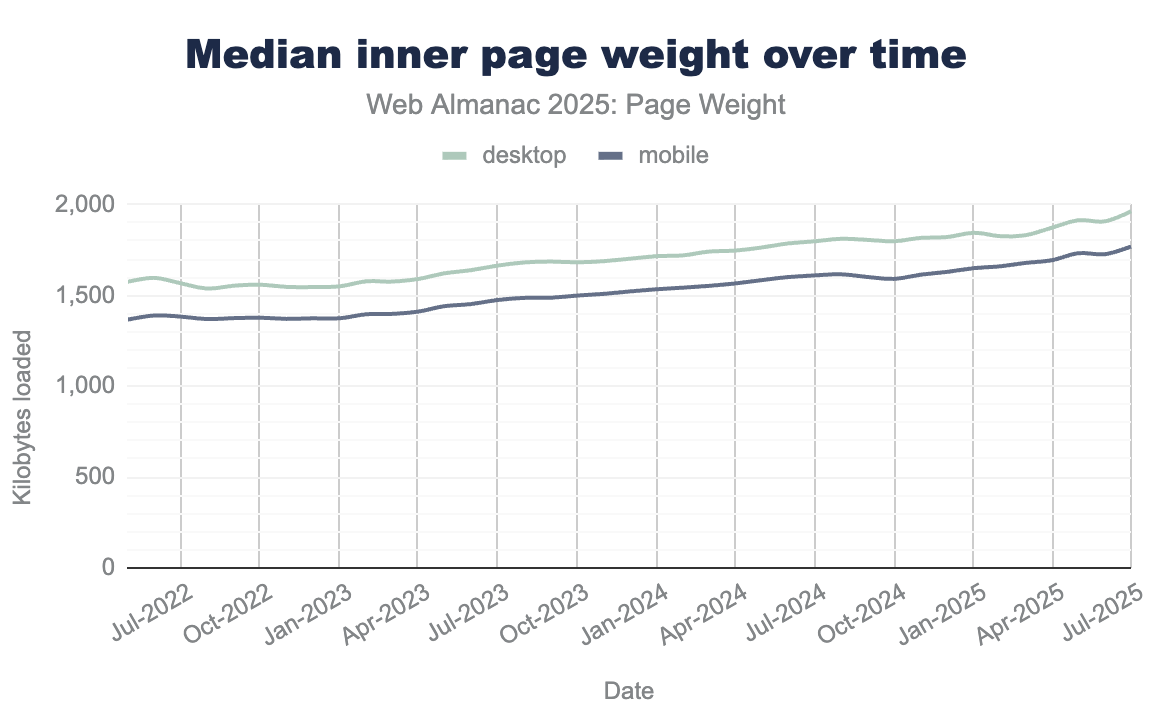
According to Httparchive data from last year, the average desktop homepage contained 22 KB of HTML source. This means our pages would need to be nearly 90 times heavier to hit Google’s new limit; however, it is also a reality that page weights generally increase year over year:
Examples That Can Increase HTML Size
Uncontrolled implementation of the following structures can lead to performance problems by increasing DOM size and rendering time:
Faceted Navigation Pages
Pages where multiple filters such as price, color, size, feature and brand are selected and open to crawling. Pages rendered with full HTML instead of Ajax can be considered within this scope.
Reviews
For example, product detail or similar pages containing full texts of 1000+ reviews.
Dynamic Comparison Tables
Comparing 20+ services or prices or using multiple tables together.
Excessive Image Usage + Structures Without Lazy Load
Before/After galleries, 30+ unoptimized images, inline SVG icon sets, Data URI images and especially inline SVG bloat the HTML.
Service Areas
Giving very detailed information for 81 provinces along with location descriptions on a single page.
Number of Products
Pages where more than 200 products are listed on PLPs.
Frequently Asked Questions
Having 100+ FAQs on a page can make it heavier. There might be especially hidden/duplicate FAQs using display:none structures.
With the structures above, I just wanted to summarize the extra loads that can occur on pages.
How to Check the 2 MB Crawl Limit?
- You can check quickly with the terminal as follows:
# HTML boyutunu kontrol edin (Mac)
curl -s "https://sametozsuleyman.com.tr/koh-samet-gezilecek-yerler/" | wc -c

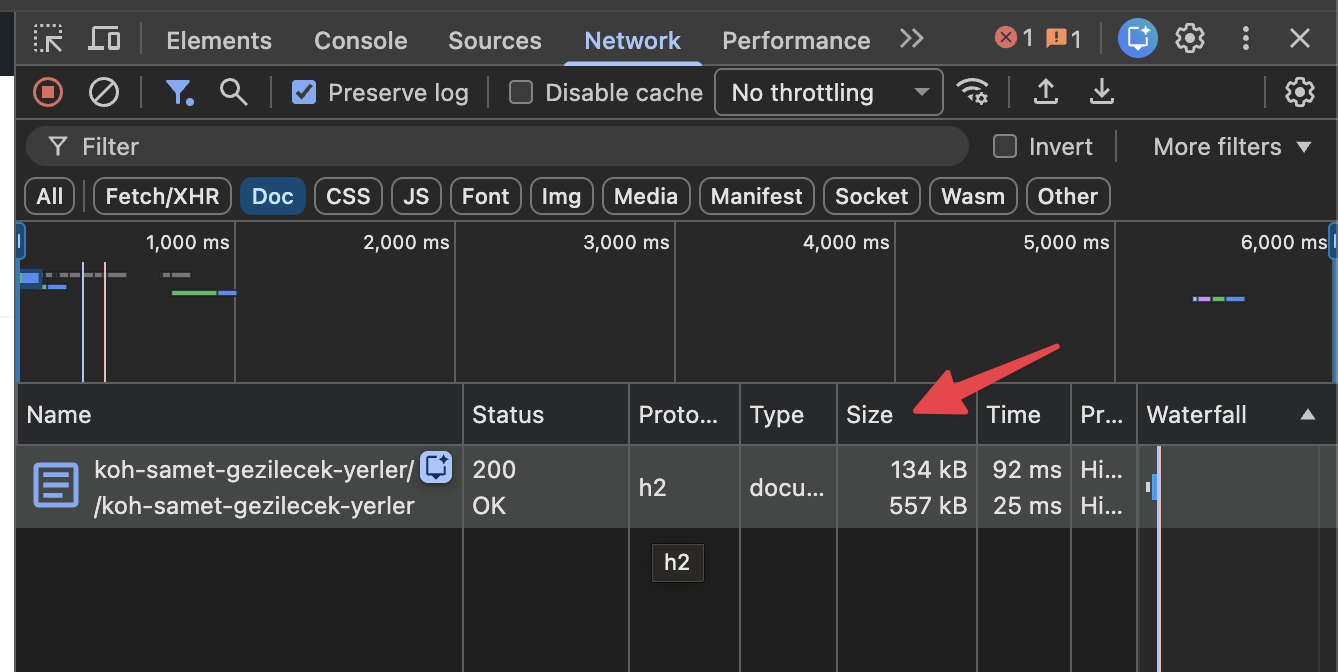
The HTML content of the example page is 154,426 bytes (approximately 154 KB) in size.
- If you want to check simply with Google Chrome, you can see the size of your HTML page in the Network section:
- Finally, you can check the crawl results from the “HTML Document Over 2MB” section under Validation in Screaming Frog:

If you see results over 1.5 MB according to all these analyses, it is time to optimize and change your strategy. Here are some suggestions for these optimizations:
Tired of reading?
You can also listen to this blog post as a podcast we created with Google NotebookLM on Spotify.
Optimization Suggestions
1) Pagination
Instead of showing 100+ products on product or listing pages, set a template for 24 or 48 items. This way, you will reduce the load in the HTML. After this process, check the traffic of paginated pages with Search Console. Sometimes subpages like page 2 or page 3 can rank better than the first page. You can note these differences. Also, be careful as showing the product description of every product on the PLP can increase the page size.
2) Lazy-Load
Don't show all 600 reviews as soon as the HTML opens. Load the first 10-15, then bring more reviews if the user wants using JavaScript.
Before: 600 reviews = ~800 KB HTML
After: 10 reviews + lazy load = ~50 KB HTML
3) Separate into FAQ Pages
Instead of using a 200-question FAQ, you can divide these questions into topic clusters and combine similar questions. Sometimes too many questions are added to pages within the scope of GEO studies without paying attention, but the technical SEO part can be ignored. As another use, if you cannot reduce the number of questions, you can consider answering these questions on separate URLs like /faq/price/ or /faq/return-delivery/.
Also, you can plan to create pages for each location instead of a single page listing 81 cities. You can publish these from URLs like .../cities/samsun.
4) Reviews
Show the total number of reviews and the average score in the HTML and remember to support this with variant schema if available; however, do not fully load thousands of reviews on the page. Ensure the full text of the reviews is loaded with JavaScript after the page loads.
<!-- Initial HTML -->
<div class="movie-summary">
<span>Inception (2010) - ⭐ 8.8</span>
<button id="load-details">Detayları Göster</button>
</div>
<!-- Film detayları -->
<div id="movie-details"></div>
What Happens If There Are Pages Over the 2 MB Limit?
If you have HTML pages over 2 MB as a result of your checks:
- Google will not consider what is above this limit.
- You will not be able to show internal links, schema codes or other important elements that remain in the lines far down the page to Googlebot.
- Contents that we can call important on the page might not be indexed because they hit the limit.
As an action, perform your example checks I mentioned just above. If your site is very large and you do not have enough budget to crawl, check your top 100 pages that are very valuable to you. You can decide where to optimize and contact the Dev teams accordingly.
In summary, our topic actually leads back to Core Web Vitals optimization. Faster load times will positively contribute to user experience and ensure you don't hit limits like 2 MB. No matter how well you optimize your pages, you won't need to fear such innovations much. Many thanks to everyone who read this far and took action!