Language Configuration Errors in SEO
One of the biggest illusions for brands in the digital world is the expectation that translating content into different languages will automatically grant organic visibility in the region where that language is spoken. However, in our project experiences, we see that international organic visibility depends on providing the right technical signals rather than just translation.
In this article, we will talk about the most common language configuration errors we encounter in the SEO world and our solution suggestions.
Even if Google bots are aware of these new pages when you translate a website into English or German, they need concrete technical evidence to understand which user, in which geography and with what intent to present them.
In our SEO audit studies, the most common error we encounter, especially on multi-language sites, is that these technical signals are established weakly or contradictorily.
Search engines, especially Google, can offer the most suitable language version to the user by analyzing their location and browser language settings. “hreflang tags” which are the signals providing this match, serve as a “signpost” informing bots which language or region version a page belongs to. If this signpost is missing, incorrect or contradictory, Googlebot cannot interpret the language and location of the page and lists that URL in the lower ranks of search results.
After briefly defining the problem that is the subject of the article, let's detail the most common hreflang errors we encounter in the transition to multi-language structure on websites.
1- Non-200 Hreflang URLs Issue and Its Relation to Crawl Budget
The “Non-200 Hreflang URLs” problem we encounter in Screaming Frog occurs because the “hreflang” URL we defined in the previous section returns a response other than 200 OK.
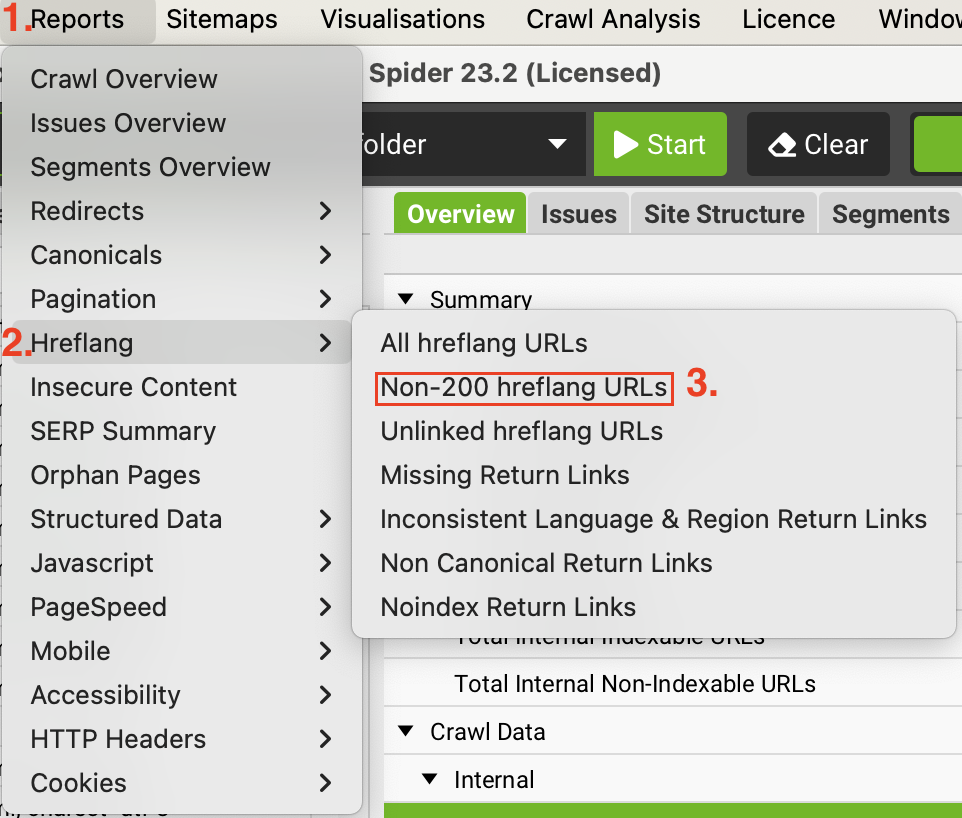
When an hreflang URL returns a response other than 200 OK, Google invalidates not only the relevant URL but, in most cases, all language versions. This situation can end the brand's international organic visibility goal as well as unnecessarily consume the crawl budget because it will present broken links to bots in your project.
As this problem fills your website with broken links and negatively affects your crawl budget, it will also delay the indexing time of your healthy pages (200 OK).
Solution to the Problem;
i) The first action to be taken in the situation we summarized above is to replace the faulty hreflang URLs with the current URL of that language that gives status 200 OK. In other words, correct versions need to be added instead of the faulty URLs pointed to by hreflang tags.
ii) If a counterpart no longer exists in that language, completely remove the hreflang tag for that language from all pages.
iii) Instead of redirecting the page to the homepage with a 301, link it directly to the relevant content. Google does not like redirected URLs in language tags; it wants the signal to reach the status 200 OK target directly.
2- Reciprocal Hreflang Tag Usage (Return Tag)
Another common logic error encountered in multi-language sites is assuming that language tags will work one-way. However, hreflang tags work reciprocally. In many of our projects, we see that brands link from the Turkish page to the English page but do not return from the English page to the Turkish page (return tag). This situation creates a communication breakdown like saying hello to a friend and them not looking at you. Google sees this communication breakdown and interprets it as “these pages are not really alternatives to each other.”
How to Discover a Return Tag Error?
The return tag logic is simply as follows: If page A shows page B as its alternative, page B must also show page A as an alternative. If this reciprocal connection is not established, Google may ignore the tags completely or interpret them incorrectly. This confusion triggers content cannibalization (stealing each other's traffic) issues, especially between different regions speaking the same language (e.g. US English vs. UK English).
Example structure:
<link rel="alternate" hreflang="en" href="https://example.com/en/" />
<link rel="alternate" hreflang="es" href="https://example.com/es/" /><link rel="alternate" hreflang="es" href="https://example.com/es/" />
<link rel="alternate" hreflang="en" href="https://example.com/en/" />
The hreflang structure is not completed just by pages pointing to each other; each page must also clearly declare its own language (self-referencing hreflang).
So an English page;
i) Must point to the Spanish version
ii) Must also contain an hreflang tag for the English version.
Otherwise, Google may not clearly understand which language set that page belongs to. It may consider the hreflang setup incomplete.
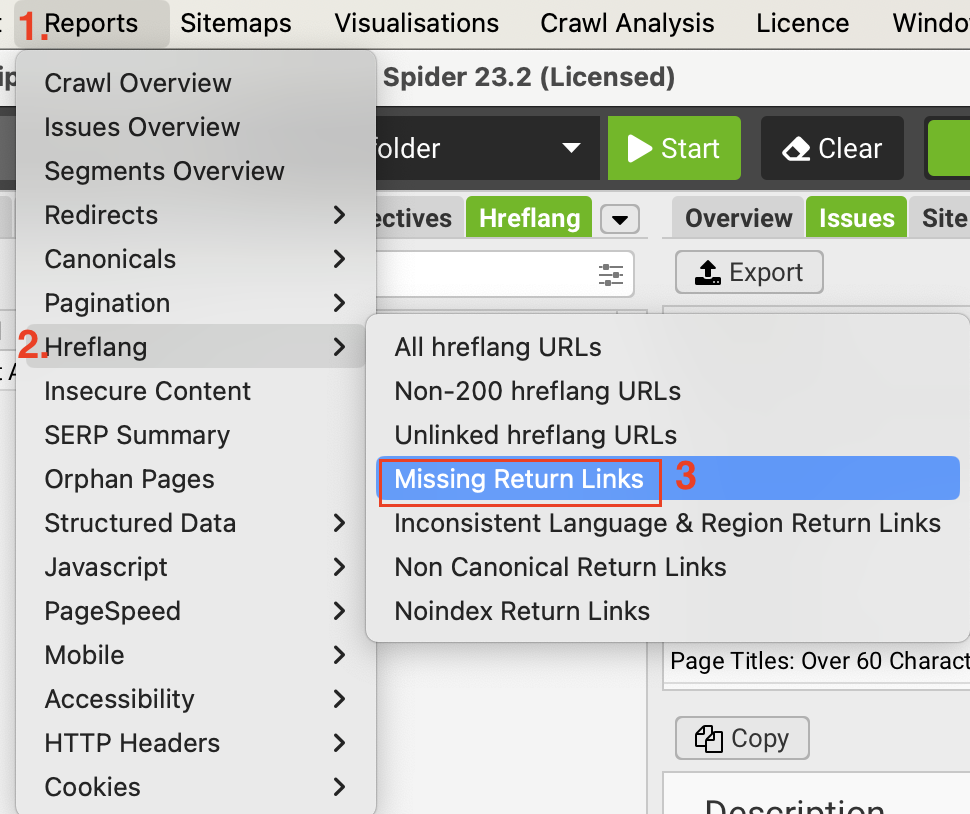
In our technical SEO analyses, we can perform return tag (return tag) checks using Screaming Frog's “Missing Return Links” report.
3- HTML Lang Tag and Content Mismatch
The identity of a page is defined not only by the hreflang tag but also by the <html lang=”...”> attribute in the HTML.
In our technical analyses, we encounter <html lang="en-US"> in the code structure even though the content of the page is completely Turkish in many CMS structures. Since this is like saying “I am British” while speaking Turkish, technical SEO tools warn you about this.
Impact of HTML Lang Tag Mismatch on SEO
Although Google prioritizes content analysis to understand the language of the page, other search engines like Bing and screen readers directly trust the HTML lang tag. A screen reader trying to read a Turkish article in English is a complete disaster for user experience. If you are receiving an “Hreflang and HTML lang mismatch” warning in tools like Semrush and Ahrefs, this is the reason and it is a significant threat to your general SEO health.
General causes of HTML Lang errors and practical solution suggestions are as follows:
1- CMS Default Errors: Leaving the site's general language setting as English causes all page titles to be based on this language. Activate page-based dynamic language definitions from the settings panel.
2- Theme Errors: Some themes write the language tag as hard-coded into the header.php file. Remove fixed codes and use the CMS's language functions (e.g. language_attributes() for WordPress).
3- Schema Synchronization: Align the HTML lang tag with the inLanguage property in Schema.org data. This gives search engines stronger signals about the page's target audience.
| Tag Type | Function | Faulty Usage Scenario |
| HTML lang | Informs the browser of the primary language of the document. | Writing lang="en" in Turkish content. |
| Hreflang | Shows alternatives in other languages. | Pointing to only one language and forgetting others. |
| inLanguage (Schema) | Language declaration in structured data. | Presenting schema data that contradicts the page language. |
4- Risks of Client-Side Translated (CSR) Content Not Being Indexed
Another SEO problem we encounter most on multi-language sites is that the language change is provided only with a button (browser-based) and the URL does not change. Although this process performed with JavaScript seems practical for the user, it causes that page to remain “monolingual” for Googlebot.
When Googlebot cannot find a unique path, namely a URL, to reach the English version of the page, that content becomes a "ghost" for Google.
In the structure above (on sites using CSR), content is formed after it runs with JS in the browser. Although Googlebot can process JavaScript, it cannot perform language selections that require user interaction. As a result, the English content never existed for the bot.
Solution to the Problem:
i) Unique URL Structure: Use subfolders like /en/, /de/ or subdomains like https://www.google.com/url?sa=E&source=gmail&q=en.site.com for each language.
ii) Server-Side Rendering (SSR): Generate content on the server side and add it to the source code as HTML. This allows the bot to understand and index the page within seconds.
iii) Dynamic Rendering: If you are using a completely JS-based structure, prefer dynamic rendering which offers a pre-rendered HTML version for bots.
Tired of reading?
You can also listen to this blog post as a podcast we created with Google NotebookLM on Spotify.
5- Correct and Incorrect Use of Country Codes (The “en-UK” Error)
The standards of language and codes used in hreflang tags are another point that should not be ignored. In our projects, we see that country codes are used intuitively many times. The most common example of this is the use of the “UK” code for the United Kingdom. Although this code feels intuitively correct, the correct code that must be used for the United Kingdom in ISO standards is defined as “GB” (Great Britain).
Impact of Incorrect Use of ISO Codes on SEO
Even the simple code error mentioned above can cause Google to completely reject the language signal. When you write “en-UK”, Googlebot perceives this as an undefined command and may see that line as a typo and move on. This small error can cause the wrong language version to appear before users in that region or cause you to fall behind local competitors in the SERP.
Solution to the Problem;
- Language Codes: Must be in ISO 639-1 format (two letters). E.g. tr, en, de, fr.
- Country Codes: Must be in ISO 3166-1 Alpha 2 format. E.g. TR, US, GB, DE.
- Sequencing Rule: Always the language first, followed optionally by the country code (language-country). Never use it as a country-language (e.g. GB-en).
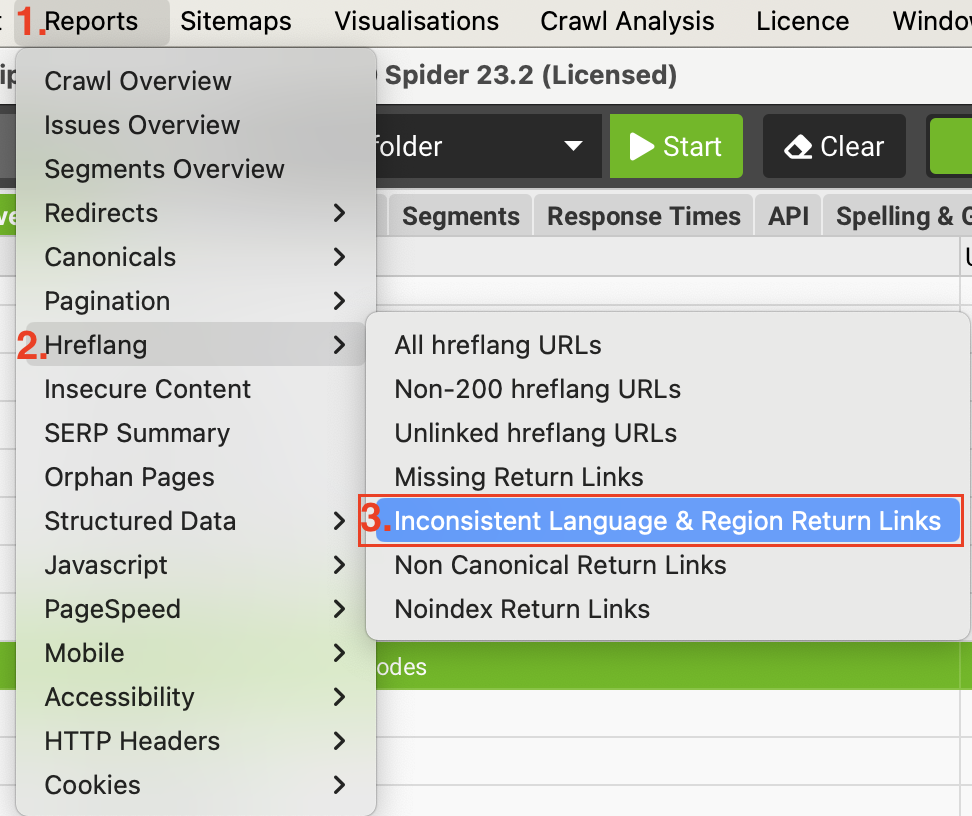
You can view ISO code errors from the Screaming Frog tool's Incorrect Language & Region Codes menu.
6- X-Default Tag: What is it? How Does It Work?
If a user comes from a region that does not match any of the language versions you targeted (e.g. if a user comes from Brazil while your site is in Turkish and English), you need to tell Google which page it should show. At this point, the hreflang="x-default" tag comes into play.
How Does the X-Default Tag Work?
The x-default tag is a placeholder saying "show this page if there is no match" to the search engine. It usually points to a language selection page or the main English page with international validity.
The absence of this tag leaves the decision of which language option to show to Google. Googlebot can also show a completely irrelevant language.
7- Canonical Tags and Hreflang Conflict
Although hreflang and canonical tags look similar, they are functionally completely different commands. While Canonical says "this page is a duplicate or the actual authoritative page is this"; Hreflang says "this page is a special version for this region."
One of the biggest technical errors is to canonical all language versions to a single "main" URL (usually the English homepage).
Faulty Usage (All languages pointing to a single 'main' page):
In the code structure of the https://example.com/es/ (Spanish Version) page:
<link rel="canonical" href="https://example.com/en/" />
<link rel="alternate" hreflang="en" href="https://example.com/en/" />
<link rel="alternate" hreflang="es" href="https://example.com/es/" />
Correct Usage (Each language having its own canonical tag):
In the code structure of the https://example.com/es/ (Spanish Version) page:
<link rel="canonical" href="https://example.com/es/" />
<link rel="alternate" hreflang="es" href="https://example.com/es/" />
<link rel="alternate" hreflang="en" href="https://example.com/en/" />
Impact of Using the Wrong Canonical Tag on SEO
Skype's canonicalizing all language versions to the main English page is the most famous example of this. In this configuration, Google says, "Okay, you say the Spanish page exists but you also claim that this page is an insignificant copy and the English one is the only true one. Then I'm only indexing the English one." The result? Millions of dollars of localization investment are wiped from search results.
Solution to the Problem:
i) Self-referencing Canonical: Each language version must definitely canonical to itself (self-referencing).
ii) Cross Check: Ensure that the URLs in the hreflang match exactly with the canonical URL of that page.
iii) Pay Attention to Redirects: The canonical tag should never point to a redirect (301) chain.
8- Hreflang Audit with Screaming Frog
The critical columns we follow in Screaming Frog and their strategic counterparts are summarized in the table below.
| Screaming Frog | Error Status | Solution Action |
| Hreflang > Non-200 Hreflang URLs | "non-200" | Identify and update URLs whose response code is not 200 OK (404, 301 etc.) or remove the tag completely. |
| Hreflang > Missing Return Links | "missing" | Add missing return links to ensure the principle of reciprocity between alternate pages. |
| Hreflang > Incorrect Language & Region Codes | "Non Canonical" | Ensure that the URLs in the hreflang tags match exactly with the canonical (original) version of the relevant page. |
| Hreflang > Noindex Return Links | "inconsistent" | Ensure that the language/region value in the return link does not contradict the target page's own declaration; synchronize the values. |
Sending the right signals to Googlebot is the only way to turn global growth targets into concrete traffic data. Quality content that stays in the depths of SERP due to technical errors is like a treasure waiting to be discovered; however, without the right keys (hreflang, canonical, HTML lang), no one can reach that treasure.
References
- What Is Hreflang? A Guide to Multilingual SEO Success
- International SEO: How to Optimize Your Site for Global Search
- What are Hreflang Tag Attributes And How To Implement Them
- Vital Hreflang & Multi Language Website Mistakes That Most Webmasters Make
- How To Audit & Test Hreflang - Screaming Frog
- Non-200 Hreflang URLs | Screaming Frog
- Mastering Shopify's Hreflang Tags!
- International SEO: Structure, Hreflang, and Common Mistakes
- How do I correct misconfigured hreflang tags in my online store?
- "Hreflang and HTML lang mismatch" error in Site Audit
- What does 'Language Mismatch' mean in Site Audit?
- Using schema markup and structured data for multilingual websites
- Server-Side vs. Client-Side Rendering: Which One is Better for SEO?
- Translate a Webpage with JavaScript & jQuery
- SEO with Websites in Multiple Languages: Best Practices
- SEO: Server-side Rendering vs Client-side Rendering
- International SEO Hreflang Guide
- Where should language localization occur: client-side or server-side?
- Issues - Hreflang : Incorrect Language & Region Codes
- SEO Spider Tabs - Screaming Frog